

Blooket Join | How to Join & Play Learning Games Anywhere
Are you searching for a platform that can improve your learning skills and personal development? I was always concerned about my students’ education and their personal growth. After exploring many options, I finally discovered Blooket, a unique and effective platform that improves kids’ learning and encourages them to solve complex problems through creative and critical thinking.
Blooket delivers education to kids in the form of educational games, where they can learn, engage, participate, and compete, making learning enjoyable and effective. But how can you explore more about it? You can learn more through Blooket Join. In this article, I will explain how you can join a Blooket game and discover everything about it. So let’s start:
How to Join a Blooket game?
To join a Blooket game, visit www.blooket.com, click “Join a Game,” enter the Game ID or scan a QR code, choose a nickname, and start playing. There are 4 different easy methods of joining a Blooket. Each is easy and has its own features. Let’s have a look.
Method 1: Blooket Join | Using Game ID
In this method, a mentor or even a colleague or friend creates a Blooket game and shares an ID with their students and fellows. It is fully controlled and safe. You can join a session using the ID by following the simple steps below:


In this simple way, you can join a Blooket session using a Game ID.
If the game ID is wrong, you will see an interface like this.
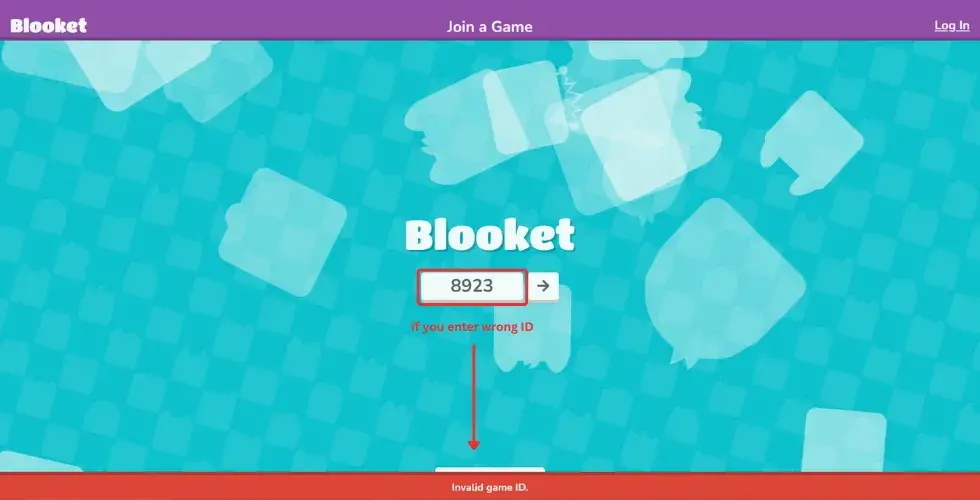
So don’t worry it is possible that the ID has expired. In these scenarios, check the shared ID again or ask your mentor to share the joining ID once more. You can also ask them to share the QR code and joining link to join the game.
Method 2: Join a Session Using QR Code

Quite an easy and simple method. Here, a mentor or even a student creates a session and shares the screen with the followers and students. You just need to scan the code with your device. Once the code is scanned, you will be in the game now to perform well, learn, and compete. Keep in mind you must be logged in to your account to scan the QR code.
Method 3: Joining Blooket through a link

Again, it’s an easy method where the game creator creates a session. When a gaming session is created, they can share a game ID, QR code, or a simple joining link. In this method, the host shares the gaming link with their audience or group. You just click on the link and join the session but must be logged in to their account.
Method 4: Join a game by Signup or Login
You can join a Blooket by simply signing up or logging in blooket. For this, you have to visit the official website, Blooket, and click on the Signup” button.

Then, you have to select your role as a teacher or student, enter your age. You can Singup blooket account by using email, or you can create it using a Google account.
If you already have an account, then simply log in to join the session.
These are simple and easy steps to blooket join and enjoy learning in an interactive and engaging way.

Watch the video to clear up any confusion about how to join a Blooket game and start learning interactively.

What is a Blooket Game?
Blooket is a popular online quiz platform designed for both classroom and remote learning. On it children improve their learning and personal development skills through gamified learning. It changes the old way of education and keeps students engaged by introducing gaming during the lesson, which encourages students to perform well and compete.
It actually prepares students to critically solve problems and daily life issues and teaches kids to work smart and have patience while working. Mentors and students can join in different ways, create an account, and share IDs with their students to complete the tasks.
How Does Blooket Work?
It’s important to know how Blooket gameplay works. Blooket is a platform for all generations, whether you are young or a teacher, you can join it easily. Here, teachers can create a question set related to their subject or even customize premade questions from the Blooket library and host it to share with their students.
Before hosting, the teacher selects the Blooket game mode, like Fishing Frenzy, Montreal Brawl, Gold Quest, etc which are designed to keep children engaged. Students join the Blooket gaming session and start answering questions.
For each correct answer, they get a chance to play a game and complete it to earn coins, Blooks, or gaming currency. This makes learning entertaining and encourages students to compete.
Importance of Blooket
In the modern world, where things are revolutionizing, education is also changing. The old way of teaching, where a teacher goes to the classroom and gives lectures, has totally changed now with Blooket Play. It revolutionizes education and plays an important role in it.
At Blooket, teachers can create question sets according to their students’ levels and get good results. Students can also connect with other fellows simultaneously and communicate with them. Teachers can track student progress and their weak points and try to work on them.
Beyond education, the benefits of Blooket also reach the business world. Many companies use it for employee training and workshops because of its fun and engaging features. Its game-based learning makes training more enjoyable and helps employees learn and remember better.
How to host a Blooket Game?
A common question: how can you share your knowledge or get results from students? The answer is Blooket host with this feature, teachers create their own customizable quizzes or even choose premade templates according to their needs and can host them.
In the dashboard, educators can create question sets, add images, and import videos to create their own customizable quizzes and add questions to host and name them. They can also use premade templates from the library by clicking on the “Discover” button and then clicking on “Host” to start the game.
Blooket Attractive Dashboard
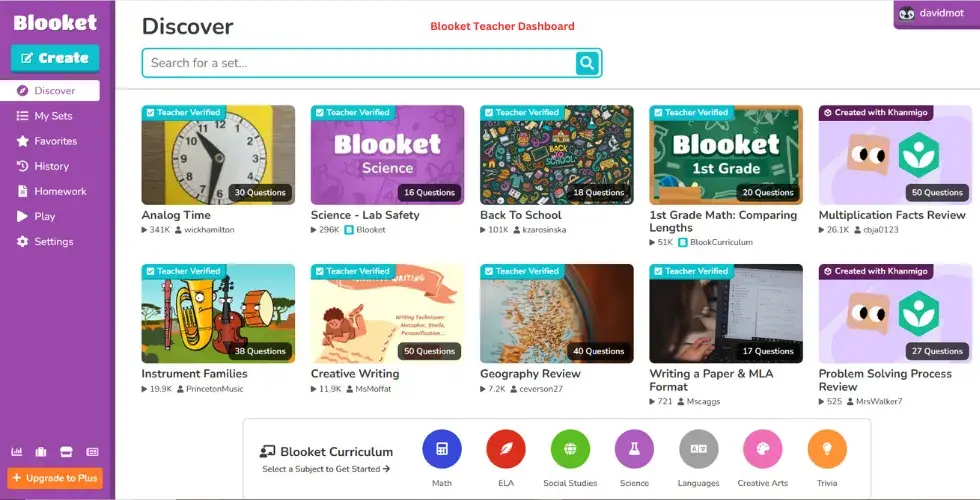
Blooket dashboard is unique and attractive, providing an amazing experience for both teachers and students. When you create an account or log in, you will see the attractive Blooket dashboard. Here are some of the features of the Blooket dashboard:
Even a layman can easily explore it without any hassle. The Blooket dashboard is unique and grabs the user’s attention.
Blooket Use | For Teachers and Students
Blooket for Students
Blooket is an encouraging platform for students that not only helps polish their educational skills but also helps build their personality and encourages healthy competition. On Blooket, mentors host games for students.
Students can communicate with their peers. Aftter every correct answer, play games, and earn “Blooks,” which motivates them to perform well and compete. They can also check their test history on the platform.
Blooket for Teachers
Teachers can embrace modern education by adopting Blooket, as it has all the necessary features. By signing up on Blooket, teachers can create their own customizable question sets, adding value by importing questions and tailoring them according to students’ needs. The game-based format helps keep students engaged.
In addition, teachers can assign assignments to their students online through Blooket and also print out their question sets. Mentors can use premade question sets for their students as well. On Blooket, teachers can monitor their students’ performance and analyze where they are struggling and which areas need improvement.
Attractive Tools on Blooket
Blooket offers a variety of engaging tools that enhance learning. These tools make studying more enjoyable and effective for both teachers and students. Let’s take a closer look at some of them:
Flashcards and Quizlet Integration
Flashcards are a great way to learn and remember important information. On Blooket, teachers can create flashcards with pictures, sounds, and videos to make learning more interactive. This helps students better understand difficult topics and keeps them interested.
Quizlet, a popular flashcard platform, can also be linked with Blooket. This allows teachers to import ready-made question sets and turn them into games instantly. It saves time and makes review sessions exciting!
Game Modes and Live Challenges
Blooket offers different game modes, such as Tower Defense, Gold Quest, and Battle Royale. Each mode presents learning in a new and playful way, so kids stay motivated. These games allow students to compete with classmates in real time while learning math, science, language, and more.
Custom Assignments with ClassMarker
ClassMarker is another tool that teachers can use alongside Blooket. It allows educators to create custom assignments and quizzes. These are great for testing knowledge and helping students become more confident and competitive. It also supports the development of decision-making and time management skills.
Reports and Progress Tracking
Teachers can view detailed performance reports on Blooket. These reports show how well each student is doing, which topics need more practice, and how learning is improving over time. It helps teachers make smart teaching choices and support every student better.
How to use Blooket in the Classroom | Tips and Tricks
As Blooket is a learning platform, it has a lot of features that attract students and keep them engaged while enhancing their learning skills. It’s easy to use and works great for group activities. Here’s how you can use Blooket in your classroom:
Key Features of Blooket Join
Blooket is a powerful learning tool designed to make classroom and remote learning more interactive, engaging, and meaningful. It combines learning with gameplay to keep students interested, while giving teachers tools to manage and improve lessons. Below are the most valuable features Blooket join offers:
Variety of Game Modes
Blooket includes multiple game modes, each with its own learning style, such as strategy-based, speed-based, or challenge-based formats. This helps students stay interested and allows teachers to choose what fits their lesson best.
Teacher-Created Content
Teachers can build custom question sets, import sets from others, or edit existing ones. They can also use images, audio, and organize content in folders to keep everything clear and lesson-focused.
Remote Learning-Friendly
Blooket works anywhere with internet access. Whether students are learning from home or school, they can join quizzes, complete assignments, and stay connected to the classroom.
Points and Rewards for Motivation
Students earn points when they answer questions correctly. These points can be used to unlock digital items, encouraging students to keep participating and improving their skills.
Real-Time Sessions with Live Hosting
Teachers can host live Blooket games where students join instantly using a game code. During the session, the teacher can monitor student performance, identify struggling learners, and offer support as needed.
Group Learning and Collaboration
It supports team modes, which help students work together, share ideas, and build collaboration skills. It’s a great way to introduce cooperative problem-solving in a classroom or online.
Private Game Hosting and Data Control
Teachers have full control over who joins the game. With private hosting and classroom-only sessions, learning stays safe and focused.
Track Student Progress
Blooket provides live data during games and reports after games end. Teachers can review performance, spot trends, and adjust lessons based on how students are doing.
Common Sense Education and Blooket Updates
Common Sense Education helps students learn safely and effectively on digital platforms. You can benefit from Blooket, the educational game platform, by regularly updating it with the newest features recommended by Common Sense Education.
Benefits of Staying Updated with Common Sense Education and Blooket
When teachers update Blooket as suggested by Common Sense Education, they improve their skills through better knowledge of useful tools. This helps teachers create fun and interactive lessons that make learning easier and more engaging. It also encourages students to develop critical thinking skills and solve real-life problems.
How to Find Blooket Resources and Reviews Easily?
Getting Blooket reviews and resources are simple. Common Sense Education’s website offers honest and helpful reviews that guide teachers on how to use Blooket effectively. It also provides lesson ideas and teaching materials to make lessons more exciting.
Students benefit too by exploring additional learning tools shared by other educators, making classroom games more attractive and accessible. Each review helps both students and teachers understand which Blooket games work best for learning.
Blooket Resources That Make Tests Easys
Blooket is a great tool for helping both teachers and students provide helpful material for test preparation. It covers many school subjects like math, science, reading, and more. Users can choose the difficulty level of each question to match what their students are learning.
Enjoyable Ways to Study
Blooket isn’t just about regular quizzes. It attracts users by providing interactive study games like:
These games help students think, practice, and learn all while playing!
Making Learning Engaging in the Classroom
looket uses game-style learning to make the classroom exciting. It includes:
These features help students stay focused, build confidence, and improve their thinking skills.
Better Than Old-Style Lectures
Sometimes, long lectures can feel boring. But with Blooket Join, online classroom learning becomes interactive. Students work together, solve tricky questions, and learn faster. It also allows classmates to help each other, which builds teamwork and a stronger understanding.
How Blooket Works with Other Learning Tools?
Blooket, a classroom engagement tools is integrated with many other tools to help teachers and students learn better. When it works with these tools, lessons become more fun and easy to understand.
Using Blooket with other Teaching Apps
Blooket works together with other digital whiteboards, video chat apps, and voting tools. By this, teachers can show lessons, talk to students, and ask questions all at once. These apps make classes simplify and easy to follow.
Blooket and Learning Management Systems (LMS)
A Learning Management System, or LMS is a special website that helps teachers to provide lessons in an interactive way. It also helps mentors to keep track of how students are doing. Blooket can connect to an LMS so teachers can see student progress and share good lessons easily.
When Blooket links with an LMS, teachers can organize their lessons and games in one place. This makes it simple for students to find their homework and learn better. It’s like having a digital classroom where everything is easily accessible.
Blooket Integration with Google Classroom
Blooket easily connects with Google Classroom, so teachers can share educational games and quizzes directly with their students. This makes it simple for students to join the learning activities without searching for links or codes. Using Blooket with Google Classroom keeps lessons organized and makes learning more engaging for everyone.
Multiplayer Activity in Blooket?
Multiplayer activity in Blooket means that a group of students play the same game together at the same time, usually in a classroom or online. The teacher hosts a live game, and students join using a game ID. Everyone plays together, answering questions and on their performance they get rewards.
Why multiplayer activity is effective and Useful?
It is useful and effective due to the following reasons:
What is Blooket Github?
There are many repositories on GitHub related to Blooket. Developers create hacks or cheats that allow students to win games easily. These cheat repositories are often shared on Discord channels where users request cheats to hack Blooket games.
Instead of relying on cheats, students and teachers are encouraged to use Blooket as it is designed to engage in fun, interactive learning and healthy competition. This improves real skill development and maintains a fair, positive environment for everyone.
Pros and Cons of Blooket
Pros
Cons
Blooket Free Vs Blooket Plus
Many ask the question, is blooket free? Yes , Blooket has a free version that’s a great choice for new users, who want to explore it and start initiative learning. You can create and play games, make question sets, and try out different game modes all without paying anything.
Blooket Free
The free Blooket plan is perfect if you’re just getting started or want to try it out without spending money. Here are the some features that blooket free account has:
Blooket Plus (Premium)
If you want even more features, the Blooket Plus plan offers extra tools that make learning and teaching even better. Here are some of the interesting features of blooket plus:
If you’re a teacher and want to personalize lessons, save time or add creativity to your classroom, the Premium plan is a smart choice for you.
| Feature | Free Plan | Premium Plan |
|---|---|---|
| Create and Edit Unlimited Question Sets | ✅ Available | ✅ Available |
| Access to Standard Game Modes | ✅ Included | ✅ Included |
| Search for Question Sets | ✅ Easy to Use | ✅ Easy to Use |
| Exclusive Plus Game Modes | ❌ Not Included | ✅ Full Access |
| Organize Question Sets into Folders | ❌ Not Available | ✅ Available |
| Earn Bonus Tokens for Students | ❌ No Bonuses | ✅ Bonus Tokens Earned |
| Copy and Duplicate Question Sets Quickly | ❌ Manual Only | ✅ One-Click Copy |
| Maximum Number of Players per Game | Up to 60 Players | Up to 300 Players |
| Add Audio to Questions | ❌ Not Supported | ✅ Supported |
| Combine Multiple Question Sets Easily | ❌ No | ✅ Yes |
Conclusion
In short, Blooket is a captivating gamified learning platform where students can learn by playing games in an engaging way. You can blooket join simply by entering a shared ID provided by your mentor or by clicking on a link to start learning interactively. It changes traditional classroom lectures into digital learning experiences.
Blooket is one of the most effective classroom engagement tools used by teachers to keep students motivated. On it, teachers can use premade questions or create customizable question sets to host games for students. At the same time, mentors can observe their students’ progress and identify areas that need improvement. Not only this, but Blooket can also be used in the business industry to train employees effectively.